
An automatic door sensor that suddenly stops working can disrupt foot traffic, compromise building security, and create accessibility issues for visitors and staff alike. Whether you manage a shopping mall, hospital, office building, or hotel, a non-responsive sensor is a problem that needs fast, accurate diagnosis and resolution.
Before calling a technician, many common sensor failures can be identified and even fixed on-site with basic tools and a systematic troubleshooting approach. This guide covers the seven most frequent causes of automatic door sensor malfunction and provides practical step-by-step fixes for each, helping you minimize downtime and maintain a safe, code-compliant entrance.
Power Supply Issues
The most common reason an automatic door sensor stops working is also the simplest to overlook: a disrupted power supply. Sensors like the M-204G (microwave, AC/DC 12V–24V) and M-254 rely on stable, continuous power from the door controller or a dedicated transformer. A blown fuse, tripped circuit breaker, loose wire connection, or degraded power cable can cut power to the sensor without any visible indication.
How to diagnose:
- Use a multimeter to measure voltage at the sensor’s terminal block
- Verify that the door controller’s power indicator LED is lit
- Check the building’s electrical panel for tripped breakers
How to fix:
- Replace blown fuses or reset tripped breakers
- Tighten loose terminal screws on the power connection
- If the power cable shows signs of wear, fraying, or rodent damage, replace it immediately.
- Ensure the transformer output matches the sensor’s rated voltage.
Sensor Misalignment
Safety beam sensors like the M-218D require precise alignment between the transmitter and receiver units mounted on opposite sides of the door frame. Over time, vibrations from door operation, building settling, or accidental physical impact can shift the sensors out of alignment—even by just a few millimeters—which breaks the infrared beam path and renders the sensor non-functional. The door may fail to close, or conversely, may refuse to close because it continuously “detects” an obstruction that doesn’t exist.
How to diagnose:
- Check if the sensor’s alignment LED indicator is off or flashing
- Visually inspect whether both units are level, parallel, and facing each other directly
- Temporarily hold a reflective surface near the receiver to see if it picks up the beam
How to fix:
- Loosen the sensor mounting screws slightly
- Align both units at the same height
- Use the sensor’s LED indicator as a guide—most models show a steady light when alignment is correct
- Tighten screws and test the door through multiple open/close cycles
Environmental Interference
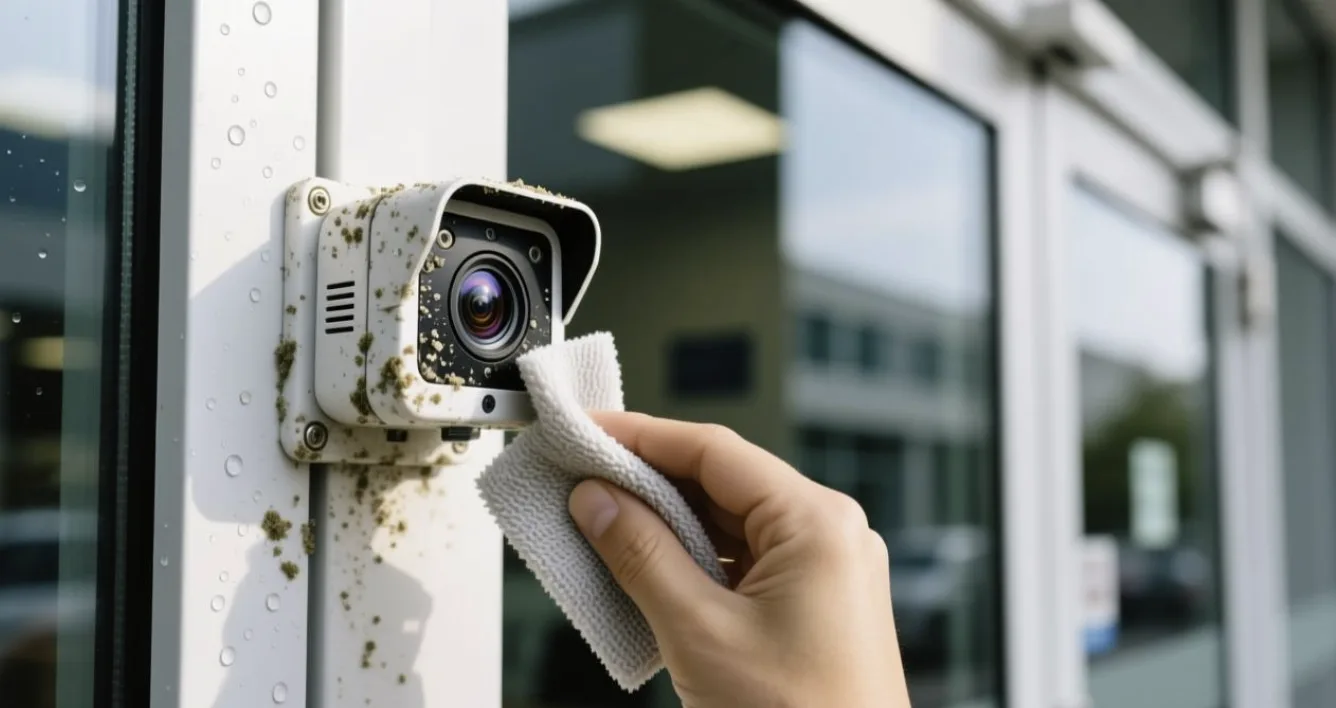
Automatic door sensors—especially infrared and photoelectric types—are sensitive to environmental contaminants. Dust buildup on the sensor lens, direct sunlight hitting the infrared window, rain or condensation on outdoor-mounted units, and even reflections from polished floors or glass surfaces can all interfere with proper detection. Microwave sensors (M-204G) are less affected by these factors but can still be disrupted by nearby metal objects or electromagnetic interference from other equipment.
How to diagnose:
- Inspect the sensor lens for visible dust, dirt, water droplets, or condensation
- Note whether the problem occurs only at certain times of day (suggesting sunlight interference)
- Check if nearby construction, new equipment, or signage could be causing signal disruption
How to fix:
- Clean the sensor lens with a soft, dry microfiber cloth—never use abrasive cleaners or solvents
- For outdoor installations, consider adding a sensor hood or sun shield to block direct rain and sunlight
- Relocate reflective objects (mirrors, polished metal signs, glass panels) away from the sensor’s detection zone
- For microwave sensors, ensure at least 1 meter of clearance from large metal structures
Wiring and Connection Problems
Faulty wiring is the silent killer of automatic door sensor performance. The connection between the sensor and the door controller runs through terminal blocks, plug-in sockets (as used in the M-218D’s color-corresponding design), and cable conduits. Over months and years of daily door operation, these connections can loosen due to vibration, corrode due to moisture exposure, or fray due to cable flexing. A poor connection may cause intermittent failures—the sensor works sometimes but not always—which can be particularly frustrating to diagnose.
How to diagnose:
- Gently wiggle the wiring connections while observing the sensor’s LED indicator—if it flickers or drops out, you have a loose connection
- Inspect terminal blocks for discolored, oxidized, or corroded contacts
- Check cable runs for visible damage, kinks, or rodent chew marks
How to fix:
- Disconnect power, then re-strip and re-terminate any suspect wires
- Tighten all terminal screws firmly (but avoid over-tightening, which can strip the threads)
- Replace corroded terminal blocks or plug-in socket connectors
- Run cables through proper conduits to protect against future damage
- For the M-218D’s color-corresponding plug system, verify that each colored plug matches its corresponding socket
Incorrect Sensitivity or Detection Range Settings
Sometimes the sensor is technically “working” but appears not to be because its detection parameters are misconfigured. The M-204G microwave sensor features adjustable detection range (up to 10 meters) and width settings, while the M-254 infrared sensor has adjustable depth and width knobs for both inner and outer detection lines. If these settings were accidentally changed during maintenance, or if the sensor was installed without proper calibration, the detection zone may be too narrow, too short, or misdirected entirely—causing the door to ignore approaching pedestrians or fail to detect people standing in the doorway.
How to diagnose:
- Test by walking toward the door from different distances and angles
- Observe the sensor LED—it should activate when you enter the intended detection zone
- Compare current knob positions with the manufacturer’s recommended settings
How to fix:
- Adjust the detection range knob to match the door’s installation height and traffic approach distance
- For the M-254, set inner and outer detection lines to fully cover the doorway threshold
- After adjustment, walk through multiple test cycles to confirm reliable activation
- Mark the optimal knob positions with a marker for future reference
Quick Troubleshooting Checklist
| Possible Cause | Check First | Estimated Fix Time | |
|---|---|---|---|
| 1 | Power supply failure | Multimeter at sensor terminals | 5–15 minutes |
| 2 | Sensor misalignment | LED indicator + visual inspection | 10–20 minutes |
| 3 | Environmental interference | Lens cleanliness + sunlight angle | 5–10 minutes |
| 4 | Wiring/connection problems | Wiggle test + terminal inspection | 15–30 minutes |
| 5 | Incorrect settings | Knob positions vs. recommended values | 10–15 minutes |
If none of the above solutions resolve the issue, the sensor itself may have reached the end of its service life or suffered internal component failure. In this case, contact the manufacturer’s technical support team for professional diagnosis and replacement guidance.
About Ningbo Beifan Automatic Door Factory
Ningbo Beifan Automatic Door Factory, founded in 2007, is a professional manufacturer specializing in automatic door motors, automatic door operators, and a comprehensive range of automatic door accessories including sensors, remote controllers, and function selectors.
FAQ
What Are Automatic Door Accessories?
Automatic door accessories are supplementary components—including sensors, remote controllers, function selectors, and safety beams—that enable, control, and safeguard automated door operation.
How Do Automatic Door Sensors and Controllers Work?
Sensors detect human movement or presence and send signals to the controller, which processes the input and commands the motor to open, hold, or close the door accordingly.
Key Components of Automatic Door Accessory Systems?
The core components include microwave motion sensors for activation, infrared presence sensors for threshold monitoring, safety beam sensors for obstruction detection, remote controllers, function selectors, and the door controller.
Why Is My Automatic Door Remote Control Not Responding?
Usually caused by dead batteries, lost pairing, exceeded code memory, or signal interference—try replacing batteries and re-pairing the remote first.